Say you have to link your Outlook.com mail lisa@contoso.com ( See more about Contoso ) with Microsoft Outlook 2010 64 bit.
First of all, Download the hotmail connector for Outlook at http://www.microsoft.com/en-in/download/details.aspx?id=21305 (for 32 bit) Or http://www.microsoft.com/en-in/download/details.aspx?id=24677 (for 64 bit).
Now double click the downloaded exe file ( named as OutlookConnector.exe ) to install it.
Now configure Outlook.com mail in outlook as you configure any other mails. See the steps below:
Showing posts with label softwares. Show all posts
Showing posts with label softwares. Show all posts
Thursday, May 29, 2014
Friday, November 22, 2013
Configuring Mozilla Thunderbird for Microsoft Exchange mail
Microsoft Exchange is the widely used mail solution in buisiness world. Microsoft Outlook is the email client used with this . But if we have to configure mail in our Linux machine, we have to go for some alternative email clients . Mozilla Thunderbird is a good alternative for Outlook. It is also pre-installed in many distros (like Ubuntu 13.10 )To configure Mozilla Thunderbird for Exchange mail , we can use an addon - ExQuilla. This addon is able to connect to Exchange 2007, 2010 and latest 2013 also.
Monday, July 25, 2011
Screen shot of Website in firefox
Screengrab addon in Firefox help you to take a screen shot of the website - either the entire screen , or current view or the selected area.
Install the addon
Addon Webpage: http://www.screengrab.org/
Install the addon
Addon Webpage: http://www.screengrab.org/
Wednesday, March 23, 2011

Friday, May 28, 2010
Automatic wallpaper changer script for Linux
I always want linux to compete with windows. In windows 7 , wallpaper changes automatically .So i wrote this script .
#!/bin/bash
#author IRFAN NASEEF P
# irfan@nitc.ac.in
# please report bugs to the author
# Usually the background pics are stored in /usr/share/backgrounds
cd /usr/share/backgrounds
num=`ls | wc -l`
#echo $num
choice=`expr $RANDOM % $num`
#echo "choice is $choice"
filename=`eval ls | head -$choice | tail -1`
#echo "That is $filename"
if [ -f $filename ]
then
gconftool-2 --type string --set /desktop/gnome/background/picture_filename "/usr/share/backgrounds/$filename"
else
#echo "$filename is not a file"
exit 1
fi
exit 0
#####
You can run this script in crontab for automatic changing of wallpaper.
Or you can put it as a nautilus-script .
#!/bin/bash
#author IRFAN NASEEF P
# irfan@nitc.ac.in
# please report bugs to the author
# Usually the background pics are stored in /usr/share/backgrounds
cd /usr/share/backgrounds
num=`ls | wc -l`
#echo $num
choice=`expr $RANDOM % $num`
#echo "choice is $choice"
filename=`eval ls | head -$choice | tail -1`
#echo "That is $filename"
if [ -f $filename ]
then
gconftool-2 --type string --set /desktop/gnome/background/picture_filename "/usr/share/backgrounds/$filename"
else
#echo "$filename is not a file"
exit 1
fi
exit 0
#####
You can run this script in crontab for automatic changing of wallpaper.
Or you can put it as a nautilus-script .
Monday, March 22, 2010
Add file to VLC playlist by right clicking
I found a simple nautilus script which is very usefull for those who usually plays something in VLC. Script to add a file to VLC playlist by simple right clicking on the file .

cd ~/.gnome2/nautilus-scripts
touch "Add to VLC Playlist"
then copy the following to the file "Add to Playlist"
Pre-requisite: Install zenity from your package manager
################
Then save ..
Now you can see a 'Scripts' option when you right click , and a 'Add to VLC Playlist' in it. Now you can directly add files to playlist by simply right clicking .

What to do ?
cd ~/.gnome2/nautilus-scripts
touch "Add to VLC Playlist"
then copy the following to the file "Add to Playlist"
Pre-requisite: Install zenity from your package manager
#!/bin/bash
## Ny Narendra Sisodiya, for SchoolOS
## narendra.sisodiya@gmail.com
## modified by: IRFAN NASEEF P
## irfan@nitc.ac.in
checkFileType()
{
file $1 | grep -i "audio" || file $1 | grep -i "video" || file $1 | grep -i "ogv" || file $1 | grep -i "mpeg"
RES=$?
if [ $RES -eq 0 ]
then
return 0
else
zenity --error --title "VLC says: " --text "Error: $FILENAME is not an audio/video file"
return 1
fi
}
IFS=$'\n'
for FILENAME in $NAUTILUS_SCRIPT_SELECTED_FILE_PATHS
do
checkFileType $FILENAME
if [ $? -eq 0 ]
then
vlc --started-from-file --one-instance-when-started-from-file --playlist-enqueue "$FILENAME"
fi
done
exit 0
################
Then save ..
Now you can see a 'Scripts' option when you right click , and a 'Add to VLC Playlist' in it. Now you can directly add files to playlist by simply right clicking .
Thursday, February 04, 2010
Open Office Recovery problem
Yesterday when i was creating my assignment document in open office, some how it crashed .so i gave a force quit.Then when i restarted open office , it shows a window saying " openOffice.org Document recovery ", and the problem was that , it neither recovering my document nor allowing me to open a new one .screen shot added here:
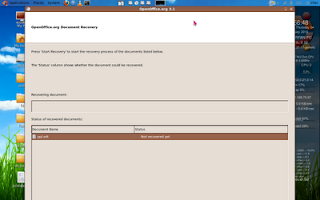
WTH. So i think this post will help those having the same problem .
To solve this problem , just goto your home folder. Press ctrl + H to show hidden files. Get into the folder as shown : ".openoffice.org" -> 3 -> user -> registry -> data -> org -> openoffice ->Office . Delete that "Recovery.xcu" ( DONE ). Now just restart your open office..It will work without any problem ..

WTH. So i think this post will help those having the same problem .
To solve this problem , just goto your home folder. Press ctrl + H to show hidden files. Get into the folder as shown : ".openoffice.org" -> 3 -> user -> registry -> data -> org -> openoffice ->Office . Delete that "Recovery.xcu" ( DONE ). Now just restart your open office..It will work without any problem ..
Friday, November 13, 2009
NMAP: The Best network exploration tool
Nmap (“Network Mapper”) is an open source tool for network exploration. It was designed to rapidly scan large networks, although it works fine against single hosts.
WHAT IT CAN DO FOR YOU ?
Nmap determines what hosts are available on the network, what services (application name and version) those hosts are offering, what operating systems (and OS versions) they are running, what type of packet filters/firewalls are in use, is there any open unfiltered ports and dozens of other characteristics.
Systems and network administrators find it useful for routine tasks such as network inventory, managing service upgrade schedules, and monitoring host or service uptime and firewall monitoring.
In between the lines, it says that nmap is an unavoidable tool for a hacker..
INSTALLATION::
sudo apt-get install nmap
USAGE:
nmap -parameters -options target_specification
PORT SCANNING USING nmap::
What are ports? Don't think that they are the one you see behind your pc , used to insert the LAN cable and USB..these are not that physical ports..these are logical ones ..you can't see them.But they are the ways by which two computers can communicate. Processes in a computer will have ports associated with them..like port 80 for HTTP, port 22 for ssh etc.. So if you want to access some other computer, you should find a open unfiltered port in that..
Ports can have these stages:
1) open : these ports have some application linked to it( Attackers can attack this way..)
2) closed : these ports are accessible but there is no application listening to it..so no use
3) filtered: these are being monitored by firewalls..
4)unfiltered: Not under monitoring..may be open or closed.
There are different types of port scanning.
1) TCP SYN scan ( -sS )
> These are default and quick
> clearly differentiates open,closed and filtered ports
> Does not establish TCP connection..so nobody catches u
> it takes less time
2) TCP connect Scan (-sT )
> creates connection with target..so this takes more time
3) ACK scan ( -sA )
> This doesn't determine a port is closed or open.
> It differentiaties only filtered and non filtered.
The list goes on..i am not listing all here..
WHAT ELSE CAN YOU DO ?
> You can detect the Operating System of the target you specified. (option -O )
> You can scan an entire subnet and find the hosts .
> You can specify particular ports to scan.( -p <port ranges>)
> You can detect the services(and their versions ) running in these ports. (option -sV)
I will show u a few examples

nmap -v -O 192.168.75.97
This will scan the system and detect the operating systems used .Output of this command is shown here and you can see detected operating system is marked.

nmap -sS -p 22,53,110,143,4564 198.168.75.1-127
This will scan specified ports(22,53..) in host in specified ip range..
Njoy
WHAT IT CAN DO FOR YOU ?
Nmap determines what hosts are available on the network, what services (application name and version) those hosts are offering, what operating systems (and OS versions) they are running, what type of packet filters/firewalls are in use, is there any open unfiltered ports and dozens of other characteristics.
Systems and network administrators find it useful for routine tasks such as network inventory, managing service upgrade schedules, and monitoring host or service uptime and firewall monitoring.
In between the lines, it says that nmap is an unavoidable tool for a hacker..
INSTALLATION::
sudo apt-get install nmap
USAGE:
nmap -parameters -options target_specification
PORT SCANNING USING nmap::
What are ports? Don't think that they are the one you see behind your pc , used to insert the LAN cable and USB..these are not that physical ports..these are logical ones ..you can't see them.But they are the ways by which two computers can communicate. Processes in a computer will have ports associated with them..like port 80 for HTTP, port 22 for ssh etc.. So if you want to access some other computer, you should find a open unfiltered port in that..
Ports can have these stages:
1) open : these ports have some application linked to it( Attackers can attack this way..)
2) closed : these ports are accessible but there is no application listening to it..so no use
3) filtered: these are being monitored by firewalls..
4)unfiltered: Not under monitoring..may be open or closed.
There are different types of port scanning.
1) TCP SYN scan ( -sS )
> These are default and quick
> clearly differentiates open,closed and filtered ports
> Does not establish TCP connection..so nobody catches u
> it takes less time
2) TCP connect Scan (-sT )
> creates connection with target..so this takes more time
3) ACK scan ( -sA )
> This doesn't determine a port is closed or open.
> It differentiaties only filtered and non filtered.
The list goes on..i am not listing all here..
WHAT ELSE CAN YOU DO ?
> You can detect the Operating System of the target you specified. (option -O )
> You can scan an entire subnet and find the hosts .
> You can specify particular ports to scan.( -p <port ranges>)
> You can detect the services(and their versions ) running in these ports. (option -sV)
I will show u a few examples

nmap -v -O 192.168.75.97
This will scan the system and detect the operating systems used .Output of this command is shown here and you can see detected operating system is marked.

nmap -sS -p 22,53,110,143,4564 198.168.75.1-127
This will scan specified ports(22,53..) in host in specified ip range..
Njoy
Subscribe to:
Posts (Atom)